- Everyone archives their own filed project email, all into the same project folder
- One readable PDF per message to click on, plus the .eml as the mailbox hands it out, untouched in .filum/originale, attachments as files (the same attachment from ten mails is stored once), threads as readable HTML
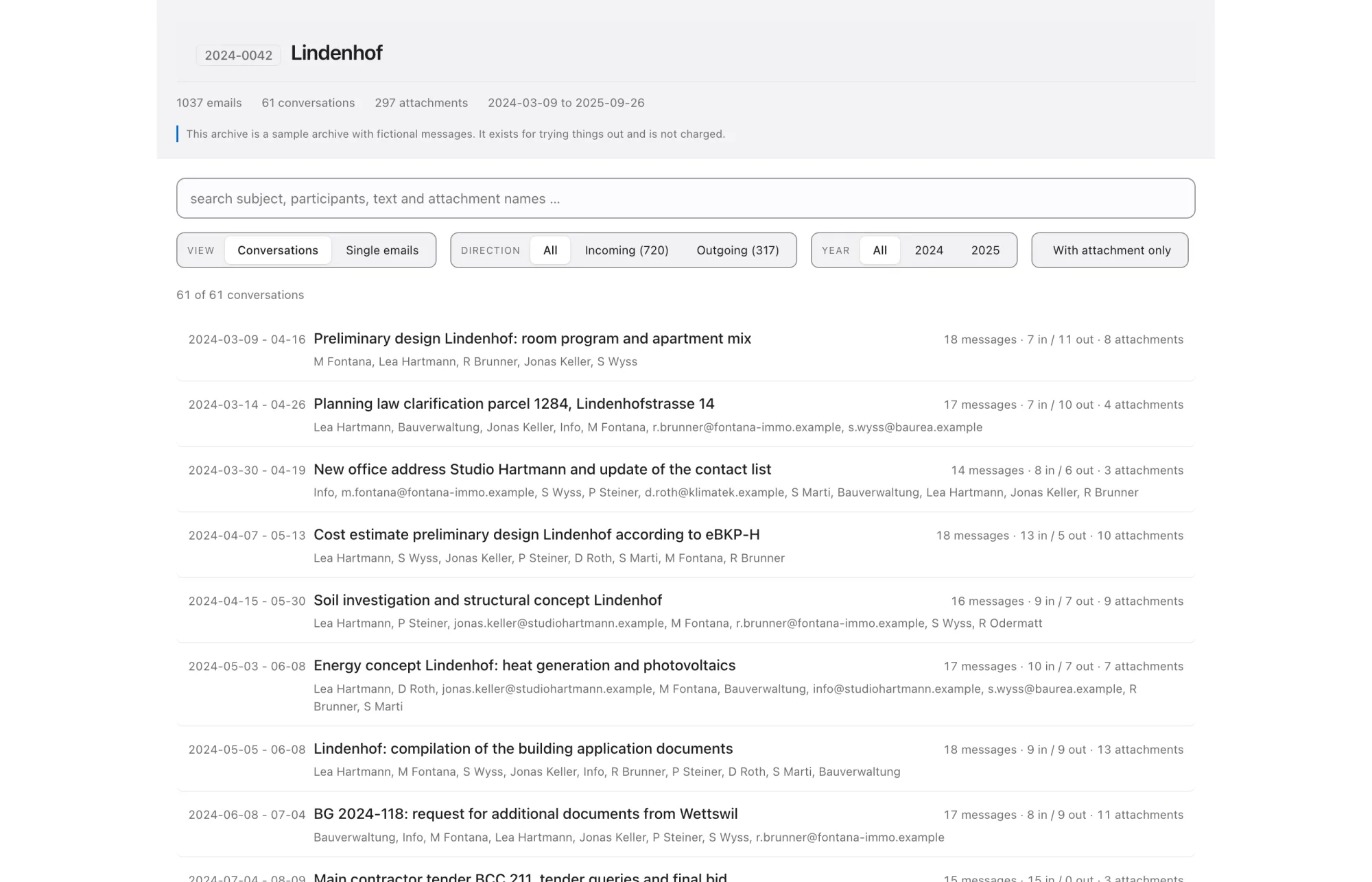
- An overview with search and filters (inbound/outbound, year, attachment), offline, no server
- Every run writes a record: a checksum over the whole holding, pointing back to the previous one, plus a timestamp from an independent service (RFC 3161)
- Overview, threads and read-me in German, English, French or Italian
- Keeps archiving every two hours on its own after the first run, securing the senders' signatures before their keys expire; can be switched off
Mail archive · Mac · Windows
Filum
Five partial views become one story.
What Filum does
Every mailbox knows only its own part.
The client wrote to the site management, the structural engineer answered the architect, the contractor got in touch with all three. Every mailbox knows its own section, and nobody has the whole. Filum brings the sections together in one project folder: everyone involved files their own, with their own sign-in, and what reads at the end is one story instead of five partial views.
Filum fetches the filed messages through the Microsoft sign-in of whoever starts the run: Filum only sees what that person is allowed to see anyway. After the first run Filum keeps archiving every two hours on its own and looks through the headers of the inbox while doing so, not the content: that is where the senders' signatures sit, and their keys expire. Whatever Filum secures waits on the computer until the matching message is filed, and only travels into the archive with it. Anyone who would rather decide themselves when to archive switches that off in the settings. Writing goes to the archive path the office picks itself, on its own NAS for instance.
A second run knows what is already there: Filum identifies each message by its content, not by the file the mail server happens to hand out. Otherwise every quarterly run would file the same mail a second time. The same message from three mailboxes becomes one file naming all three places it was found, and Filum puts the threads together itself, because the same conversation is named differently in every mailbox.
- Five years of liability from acceptance (Swiss CO art. 371 para. 2) and thirty days until the mailbox of someone who left is gone
- Whoever searches in five years needs a file manager and a browser, not Filum
- Re-check it without us: the archive carries a short script that verifies the chain with the Python standard library alone
- The storage location belongs to the office: a path in your own archive, no cloud of ours
- One sign-in: the same login fetches the mail and connects the bimover account
Why it exists
- Architecture and planning offices from around five people (below that, filing by hand is still manageable)
- Offices on Microsoft 365 with an archive of their own on a NAS or server
- Projects whose correspondence has to outlive the liability period
Best fit for
In the archive
What ends up in the folder
Files, not a database. Two things are visible: the page you click and the folder with the messages. Everything else sits in a folder called .filum. The leading dot hides it, because nobody needs to click it; nothing is lost.
-
Mails ansehen.htmlThe main entrance: search and filters by inbound/outbound, year and attachment. The search index sits inside the HTML itself, so the file works straight off the disk. -
Mails/Each message as its own PDF file to read. Date and time come first in the name, so the folder sorts chronologically. A PDF opens on any computer without extra software. -
.filum/originale/The messages as .eml, untouched: the bytes as they came from the mailbox, the most original form Filum gets. Each carries the same name as its PDF, only with a different ending. They are the evidence, the PDF is the reading copy. -
.filum/verlaeufe/One thread is one readable HTML file, in order from the first to the last message. -
.filum/anhaenge/Extracted and stored only once: the same drawing from ten mails is there exactly once. -
.filum/verzeichnis.csvThe emergency exit: one row per mail, readable in any text editor and any spreadsheet program. -
.filum/liesmich.txtWhat this is and how to search it, for the person who opens the folder for the first time in eight years. -
.filum/belege/One record per run, chained to the previous one, plus a third-party timestamp. Filum fetches it as soon as the timestamping service can be reached; if it could not, the next run or the next check seals it afterwards. It can be re-checked with the script .filum/pruefen.py, which needs nothing but the Python standard library.
The file name already carries half the search
2019-04-02 0914 Eingang - Anna Muster - Baugesuch Sonnenhof a3f19c82.pdf Date and time first, so every file manager sorts chronologically. Local time, not UTC, because you search for the time that stood in your mail program. ASCII only, because Mac and Windows store accented file names differently and that breaks over SMB; the real subject line lives in the overview and in the index.
Documents
To read and to fill in
Eight sheets as PDF, in German. The first four explain what Filum does and what it does not. The other four are templates for the rollout in your office: you fill in the brackets, and your legal advisers read over it.
To read
- When someone leaves, the project stays For the office management: why project email belongs to the project, not to the mailbox.
- Filum, technical For IT: permissions, data paths, archive format, verifiability, operation and limits.
- Filum and data protection Roles, what leaves the device, access requests, deletion, retention by category.
- What the archive carries in a dispute Evidentiary value under Swiss civil procedure, the deadlines of the building trade, and what to do first.
To fill in
The templates are also available as editable text, in the open and under a licence that allows adaptation. Anyone introducing a policy usually changes it. View templates as text
- Policy on email and internet use
- Archiving policy
- Record of processing activities
- Building blocks for privacy notice and contract
The four sheets to read are available in English and German; the templates are in German. Not legal advice. Every sheet names the provision it relies on and says where a question is open.
Pricing
Per archived mailbox and year
What counts are the mailboxes that were archived from, not the people who start a run. The same mailbox across two projects of the same office counts once. The total works like a tax scale: each rate applies only to the mailboxes in its own range.
1-10 mailboxes
CHF 50
per mailbox in this range, per year
11-20 mailboxes
CHF 40
per mailbox in this range, per year
21-30 mailboxes
CHF 30
per mailbox in this range, per year
31+ mailboxes
CHF 25
per mailbox in this range, per year
What will it cost your office?
per year
CHF 45 per mailbox on average
That is the minimum.
More than 100 mailboxes? Write to us and we will work it out together.
Minimum CHF 250 per year
That is the price for 5 mailboxes. Anyone archiving fewer still pays the smallest package. Invoicing and warranty cost the same at two mailboxes as at twenty.
Support when you need it
The first year comes with 2 hours, for the setup and a walk-through with the team: CHF 380. After that, support costs what it takes. The more hours you draw over the years, the cheaper the next one gets, and the count never falls back.
- hour 1 to 5 CHF 190
- hour 6 to 10 CHF 170
- from hour 11 CHF 150
The rates apply to every bimover program, not just Filum, and they are the same whether you pay in advance or on account. Hours paid in advance should be used within two years; after that we get in touch before anything expires.
Three years paid in advance cost two and a half annual fees, so CHF 2 250 for 20 mailboxes.
Anything caused by a fault in our software costs nothing, ever. Whoever bills their own mistakes by the hour is selling their mistakes.
After each run the app reports which mailboxes were archived: as hashes, never as addresses. Plus how many messages the archive holds, which run in order it was, and the record of that run. That is how a shrinking archive shows up later. No content leaves the office: no subject line, no address, no file name.
How Filum reaches the office
Sign in, choose folders, start the run
Three things before the first run: the sign-in, an archive folder and at least one Outlook folder to archive from.
It fetches the mail and connects the bimover account at the same time; there is no second login. If an office only allows outside programs after approval, its IT approves Filum once; in the Microsoft admin centre it is listed as “Filum Mailarchiv”. The app shows the link for that exactly when a sign-in fails because of it.
One Microsoft sign-in
The office picks the storage path itself. Your own domain comes from the sign-in, and that is how Filum tells incoming from outgoing. Anyone writing under several domains adds the others in the app settings under “More of your own domains”.
Archive folder and own domain
Each participant files their project email into an Outlook folder of their own and archives it themselves into the same project folder. Filum brings the messages together there.
The Outlook folders
Standalone apps for macOS and Windows. Both are built from the same core: same steps, same labels, same result. The Mac version comes first.
Platforms
Honest status
What Filum does not promise
So nobody reads anything into it that is not there.
- Filum does not prevent changes, it makes them detectable. Anyone with write access to the folder can change files. The record then shows that something is different.
- No seal, no write-protected drive, no blockchain. That is a decision, not a backlog item.
- Whether a given retention setup satisfies the rules is decided by the procedure in the office, not by a program. We say what Filum does; we do not give legal advice.
- Filum archives only what was filed. After each run Filum reports how completely the conversations already begun in the archive are filed. About a conversation nothing was ever filed from, Filum says nothing.
- Not captured as messages: Teams chats and drafts. Cloud attachments that arrive as a link instead of a file are archived as that link.
- For every message Filum writes an archive file to read. It reproduces the content, not the look: fonts, colours and the position of images in the text are lost, and a few image formats are left out entirely. The mail's .eml sits untouched in .filum/originale.